
Roll over image to zoom in
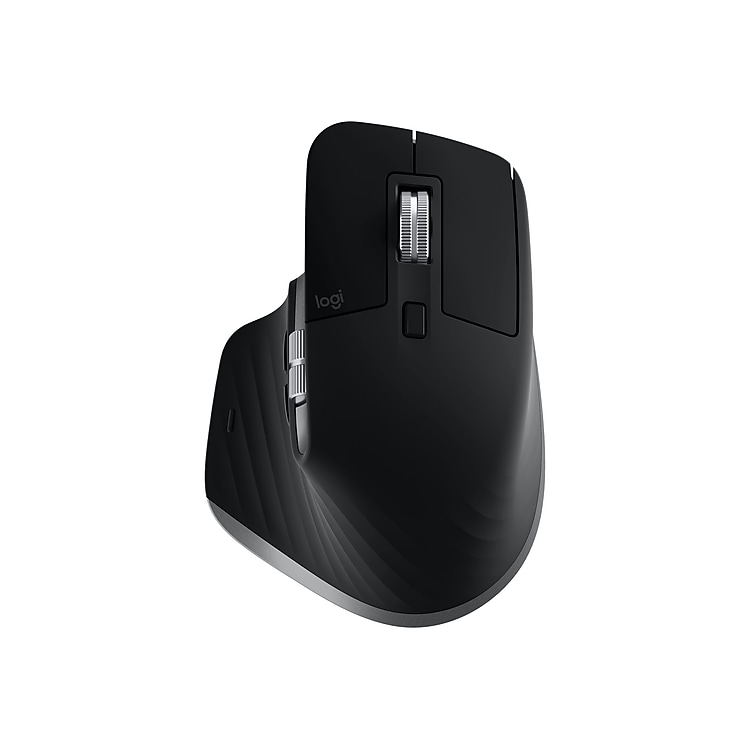
Logitech MX Master 3 910-005693 Wireless Laser Mouse, Space Gray
Laser mouse allows you to have complete control over cursor movement. Take this reliable wireless mouse anywhere. Tack on any surface, even glass, with the Darkfield 4000 DPI laser sensor.
The MX Master 3 mouse is now mastered for Mac. Get more out of your Mac and iPad with the MX Master 3 mouse. Finished in space gray, this mouse is fast, precise, and comfortable.
- Laser mouse allows you to have complete control over cursor movement
- Take this reliable wireless mouse anywhere
- Tack on any surface, even glass, with the Darkfield 4000 DPI laser sensor
- Rechargeable Li-Po (500mAh) battery
- Seven-button design for speed and enhanced functionality
- Includes gesture function for easy movement through documents and pages
- Signal lets you control your cursor from up to 33′ away
- 1-year manufacturer limited warranty
Additional information
| Weight (Ounces) | 11.97 |
|---|---|
| Width in Inches | 2.28 |

by James
The listing does not specify that this is the Mac version. I bought it to use with a PC, and it works fine but does not come with the USB dongle. Staples needs to be more careful about how they describe the products.
by Paul
This model is for Mac and I accidentally purchased it for my PC laptop. Seems the only difference is that this model does not come with a USB dongle. Though, it still connects via Bluetooth.
If functions very well and smooth. Its really worth the buy!
by Ivan
The “Space Gray” variant is actually a “MX3 for Mac” and comes with no USB dongle, assuming you will use it via bluetooth.
Otherwise great mouse!
by Michael
Premium feel. Very comfortable for heavy CAD users. Customizable buttons make it easy to control multiple functions.
by Kate
I bought the mouse to compliment my MX Keys keyboard. I am not disappointed. I simply love the ultra-smooth scrolling with the metal wheel. It also has a very convenient side wheel to switch between tabs. Charges pretty fast and on/off button is nicely placed. I did find the forward/backward buttons not easily reachable but it is not a big deterrent. However I do feel that for such a premium product, the click was silent. That would have been the icing on the cake.
by Rob
I have had a number of the previous gen. MX mice and they’ve been great. This one is no different. It’s has a great feel and completely customizable.
I trade between this, the MX Ergo, and the MX Vertical just for variety.
by Mike
For two years I struggled with a “Magic Mouse” with my iMac. The magic might be the pain it caused me in my upper arm and shoulder.
This mouse feels great in your hand, glides along the desk, and highly customizable with the nice Logi software.
by Joshua
Comfortable to use. I was using a vertical mouse to help with wrist pain, but the shape of this mouse helps alleviate the stress that a normal mouse causes me. Functionality is great and fits my hand beautifully. I tried the Master 2S before this and while they are very similar, the scroll wheel feels much better on the 3 and the 3 just fit my hand a little bit better. Its hard to describe it. The 2S feels great, until you compare it to the 3, and then it’s just missing something.
by Chris
I use a M1 Macbook Pro while working away and a Windows PC at my home office. I tend to build muscle memory with mice and didn’y like transitioning from one size to another. The MX3 has some awesome features (thumb scroll for excel is a huge timesaver) and transitions easily from one PC to another with a small button on the bottom of the mouse. Battery life is good. No sensor issues (I’ve had Logi mice that were picky with mousepad material before). Great mouse for gaming/work/general use.